Wednesday, August 22, 2012

No, You Can't Use Flickr To Infer Things About Everyone

Suprise surprise, MG Siegler is once again talking out of his daire aire when it comes to supporting his favourite company on Earth. Recently he's been posting cameraphone stats from Flickr on his Tumblr blog. Take it away, MG:

The good news: Android is finally on the verge of overtaking an iOS device on the chart.

The bad news: this iOS device is four years old. It’s so old, in fact, that the iPhone 3G was taken off the market by Apple a year ago. Yet there still isn’t a single Android device that can pass it on this chart. Pretty pathetic.

The other bad news: the iPhone 4S and iPhone 4 are so far ahead of the rest of the cameraphone pack that it seems highly unlikely that any Android device will come close anytime soon. In fact, they’re the number one and number two cameras used to take Flickr photos, period. Not smartphone cameras — cameras, cameras.

The really bad news: the new iPhone is a month away.

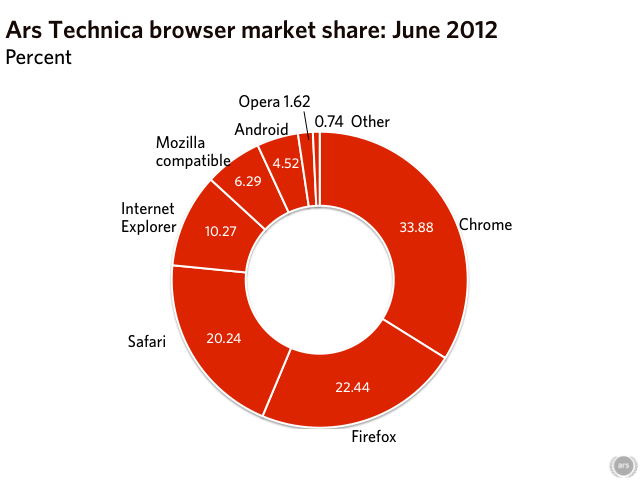
Unfortunately, the really really bad news for MG's argument is that Flickr isn't used by normal people.[1] It's used by photographers, who actually want to showcase their work, as opposed to people showing off their snaps of their drunken party - thus the stats are highly skewed. It'd be like pointing to Ars Technica as representative of browser market share - yay, IE at 10% share!

Since MG makes a big deal about the iPhone holding the top two slots in cameraville, let's take a look at that chart:

You see the other three cameras? They're all DSLRs. Even the point-and-shoot cameras are all high end. This is a good example of how Flickr is not representitive, unless MG is willing to say that the most popular camera in the world is a DSLR.

If we were to draw any conclusions, it's that people who have high end cameras are also more likely to have an iPhone (as opposed to something cheaper.) In fact, I'd think it most likely that people are using the iPhone as their secondary (i.e. backup) camera, and it's the sheer number of people doing it that's propelled it to the front of the stats. (This is backed up by the fact that back in 2008 the most popular camera on Flickr was a high-end point-and-shoot.)

So basically, MG's making some more hay that amounts to, essentially, nothing. What a surprise.

[1] Okay, sure, some normal people use it, but some people use deviantART and Flickr for storing screenshots - that doesn't make it a good indication of anything.

Tuesday, January 17, 2012

Why Twitter is a terrible place to debate

I’ve had a few debates on Twitter, and pretty much all of them have been annoying.

No, not because of people who don’t get what I’m trying to say (although they are annoying) but because of Twitter itself.

Let’s get to the nitty-gritty:

  1. 140 characters are simply not enough. Don’t get me wrong, the character limits are great for certain things – many times I’ve found a better way of expressing my thoughts than initially when trying to fit within 140 characters.

    That’s all very well when updating my status or expressing isolated thoughts. But when I’m shooting off replies in a debate, I’ve invariably needed to abbreviate, mangle my grammar, and split tweets to fit within the character limit.

    That last one brings me to:
  2. People will try to reply to your tweets, even if you haven’t finished making your point. In my experience, the debater invariantly tries to reply to your first point before you make your second point.

    Sometimes they do so with something that would have been answered in your second point. But often it’s something that takes you on a long winding tangent away from the original topic, especially if they can continuously reply before you can actually finish writing your second point.

I’m probably not going to stop debating on Twitter, though, but I am going to consider taking it to Google+ if it warrants a long response (or my blog, if I think it’s interesting enough to write at even greater length.)

Thursday, November 24, 2011

Why I’m Not Using Facebook Comments

A while back, TechCrunch switched from using Disqus to Facebook Comments for its comments section.

TechCrunch says this is to cut down on people being jerks by forcing them to post under their true name, and I’m fine with that. In fact, the reason I post under the pseudonym ‘MarkKB’ (my first name and the initials of my last) is that I believe accountability is a good thing. I want to be known for both my opinions and the stuff I do, good or bad.

However, the implementation of Facebook Comments as it is right now doesn’t work for me. The reason is really simple, to be honest, and maybe I shouldn’t be as annoyed as I am, but I am.

The problem is there’s a lack of control.

Again, I don’t care about the fact that my name gets displayed for all to see. I’m fine with that. But I can’t control where users go when they click on my name – it’s my Facebook profile or nothing.

My Facebook profile is my personal space on the web. Sure, people can find it by searching for my (rather unique) name. But forcing people to search for it means that only people who really want to expend the effort of being my friend will do it. I want to discourage random people popping in and deciding to be my friend – that’s why I don’t link to my Facebook account elsewhere.

And that’s what Facebook Comments undermines.

It doesn’t have to be this way, of course. Facebook knows my website address. It knows my Twitter account. There is no reason why they couldn’t link to either of these (even if it has a ‘Here there be dragons (that Facebook doesn’t control)’ landing page first). There’s no reason why I shouldn’t be able to link to one of my Facebook pages.

There’s no reason they can’t implement Twitter login support like they promised the users back in March.

The only thing my cynical brain can think of is Facebook wants to monetise its users by emphasising its own website above user choice. Either that, or they’re being lazy.

And that’s something I simply cannot get behind.

Postscript: Yes, I know Facebook allows logins from AOL, Yahoo! and Hotmail. The problem there, however, is threefold: 1) They don’t link to the profiles of any of the three. 2) They don’t import the avatar of any of the three. 3) Those are all inherently private networks – my problem is I want to be able to link to my public accounts.

I do, however have some ideas on how Facebook can improve how it works even if they do continue to link to my Facebook profile. I’ll discuss those at a later date.

Tuesday, June 14, 2011

Why the devs Peter Bright wrote about are wrong (and why Peter Bright is right about what to do about it)

Earlier this week, Peter Bright wrote a passionate piece about developers seemingly being up in arms about two sentences in the Windows 8 tablet demo from D9. (This follows two similar, albeit less detailed, pieces: one from Mary Jo Foley and the other from Paul Thurrott.) Those sentences, spoken by Microsoft VP Julie Larson-Green, are as follows:

“So this application[, an immersive weather application,] is written with our new developer platform, which is based on HTML 5 and JavaScript. People can write new applications for Windows using the things they are doing already on the Internet.”

Apparently, some developers have taken this to mean that the only way to write immersive apps is through HTML 5 and JavaScript. Peter Bright thinks this interpretation is completely rational. I disagree, and in fact I’m going to come right out and say it – anyone who got that from that statement is making a rather large logical leap.

It’s Called A Non-Sequitur For A Reason

These are the facts presented in the above sentences:

  • The weather app is an immersive application.
  • HTML5/JavaScript is the base for a new development platform from Microsoft.
  • The weather app uses the HTML5/JavaScript-based platform.
  • People can now use their experience from HTML5/JavaScript to write Windows 8 programs.

It doesn’t follow from this at all that HTML5/JavaScript will be the only medium for development, merely that you will be able to write an immersive app in HTML5/JavaScript. It may be the only option, but it’s rather ridiculous to assume such from the above statements.

It appears that the argument is as follows:

  1. All HTML5/JavaScript apps shown at the demo are immersive apps
  2. I want to develop Program X as an immersive app
  3. Therefore I will have to develop Program X in HTML5/JavaScript

This is a logical fallacy known as the ‘fallacy of the undistributed middle’. In this case, the ‘undistributed middle’ is that ‘all immersive apps are HTML5/JavaScript apps’, which is at this point unsubstantiated.

Evidence, Shmevidence

First off, the Weather, Piano and Stocks apps were the only apps explicitly mentioned to be HTML5/JavaScript. None of the other apps demoed were described in this manner.

Secondly, we know Internet Explorer is an immersive app, and we know that it’s written in unmanaged C++. Unless they are suggesting Microsoft will be using private APIs for IE9 (a move that is A) unprecedented in Windows history and b) would surely get antitrust investigators on their tail lickity-split), or that IE9’s immersive mode is an HTML application (also unlikely), then I somewhat doubt that HTML5/JavaScript will be the only way to develop immersive apps.

There’s Nothing Stopping You Anyway

Let’s face it – ‘immersive’ apps are full-screen apps with touch controls. Are developers really suggesting that it will be impossible to write such an application for Windows 8?

Windows 7 added touch APIs. These will still exist in Windows 8. And it’s trivial to create a full-screen application with large text, buttons and whatnot – and since Metro is a design language, not an API, as long as it behaves like Metro, it is, for all intents and purposes, Metro. The fact of the matter, then, is that it’s silly to state that you can’t make an application for Windows 8 that you can do right now using existing APIs.

If it turns out you need to code in HTML5/JavaScript for live tiles, then a stub application will most likely be a cinch to make. I mean, people already do basically the same thing for Gadgets anyway, and Live Tiles are essentially Gadgets that launch programs.

So even if the developer’s fears are justified, they’d still be able to easily make an ‘immersive’ app, even if it’s not using any special API to do so.

But that’s a huge ‘if’, and one that seems incredible, to say the very least.

Nothing Is Being Said Because Nothing Needs To Be Said

At least, that was my initial reaction to the article, and that was probably Microsoft’s thinking as well. I would have argued that any developer who took “here’s an immersive app, and oh, it’s developed in HTML5/JavaScript” and got out of it “HTML5/JavaScript is the only way to develop immersive apps” should probably not be allowed to develop for Windows 8 anyway (or any platform, for that matter, because they’d be continually worried about being abandoned whenever anyone announces a new platform and doesn’t mention the old one.) They probably shouldn’t work in the aviation industry either, least they be worried that when Boeing announces the 797 or whatever and not mention any of its previous planes that Boeing will stop making or supporting them.

Microsoft Should Probably Say It Anyway

But the problem is, it’s not just irrational developers on the Silverlight support board. Ina Fried, writing the official analysis for the demo, also interpreted the statement in the same way as the developers Peter Bright and others mention, which was also carried over in Joanna Stern’s write-up for this is my next, and Oliver Haslam’s write-up for Redmond Pie. And completely rational and logical-thinking developers are going to read these sources and think that immersive apps will be HTML5/JavaScript only, having not the time, patience, ability or knowledge to view the original demo.

So, in the end, I do agree with Peter Bright (and thus Thurrott and Foley) on this point: for the sake of all this sillyness, Microsoft should make an official statement that HTML5/JavaScript won’t be the only way to develop immersive apps, and that you will be able to develop them in .NET and Win32 as well.

My real issue is that this shouldn’t need to be said at all. Peter Bright claims the problem is with how Microsoft worded the statement, and again, I disagree – I think it will be a sad day when tech demos need to devote time to point out the blindingly obvious.

But obviously, we can’t force tech publications and developers to take a course in logical thinking, so an official statement is really the only way to solve this. Sitting in silence until BUILD will only create confusion and possibly even get developers to not develop for Windows 8. And, if anything, loosing developers at this critical time is not something Microsoft can afford.

Conclusion

So, in summary, I do not believe that the fears developers have about having to develop immersive apps in HTML5/JavaScript are rational, nor do I believe Microsoft should have to make an official statement. However, to prevent conclusion, I do believe that they should, if only to dissuade these irrational fears from getting into the minds of the mainstream of developers.

Edit: I should note that both Paul Thurrott and Mary Jo Foley also wrote articles about the same developers Peter Bright did. I blame the previous few weeks without Internet (I’m still catching up on some things) and I’ve edited the article to more generalise it.

Friday, February 4, 2011

A Modest Proposal: Private Clouds on a Large Scale

This blog post is based on a post I made on the Ars Technica forums. It’s been edited here for spelling, clarification and to add an idea I had.

I really don't like the idea of my data being in 'the cloud' in a primary sense. Backup? Sure - if there's data loss, I can just make another backup. Publication? Sure, that's what the Internet is for.  Full-hog is a different thing.

It's an issue of control. With local data, I own (in a physical sense) all parts of the system - the computer, the hard drive, the metal filings that represent 0 or 1. I can literally pick up and hold my data, and take it with me. With the cloud, the data is on some server far away, and all I have is a projection of that data.

The same with apps. If a company goes out of business, I can play their games or run their programs indefinitely. If I don't like a new version of the program, I can keep using the old one. Because I own the physical data on my hard drive, I don't have to follow the whims of a company if I don't like it.

If we switch to a world where apps were served by remote computers to our own (as with web apps and streaming games), then I no longer have that control. If a company shuts down or discontinues a service, I have no recourse. If I don't like a new version of something, I can't use old versions unless the company makes provisions for such a thing.

For me, the convenience is simply not worth the loss of control.

However, I'm a big fan of the 'private cloud' - servers that I own that can stream my data anywhere. Right now, I've set up a file server that stores my documents and music, and I can access this via LAN on any computer in the house. It's very liberating.

There are three problems with private servers, however:

  • Marketing: This is a big one. Consumers don't know what servers are and how they can help, and it's clear that companies don't know how to market servers to consumers (one would only have to look as far as Microsoft and WHS to see that.) Companies should emphasise the convenience factor, and the ability to access your files from anywhere over the network (and, in the future, the internet).
  • Distribution/Expense: Even among geeks, a small percentage use file servers. Part of this is because of not being able to justify the expense of buying a computer or paying for power just to serve files, and part is because private servers are so few that no-one really considers it.
  • Ease of use: To a consumer, it's relatively hard to set up file shares, network drives, redirect profile folders, etc. It's a hurdle that most ordinary people will find difficult to overcome.

So, here's my proposal:

A server system that's made up of a computer and a removable drive (which will store the user's data.) The company that makes these servers cuts deals with real estate companies to place these servers, as well as wifi routers, in new and resold homes, offering to train for free real estate staff so they can help consumers set things up, and make deals with power companies to not charge for the server's power usage (read by a meter attached to the server), etc. These servers can be placed in the wall behind a service panel, with a collection of USB sockets embedded in the wall (like telephone and power sockets in most homes today) - this will be where the drives will be attached - and maybe a simple LCD display with relevant information.

The removable drive contains a key on it in a standardised location, as well as a user-set password[*]. They key is also printed somewhere for the user's reference. If two removable hard drives are attached, it duplicates the files on the second hard drive - basically, software RAID 1.

[*] This could be implemented as a drive-wide encryption, with the password/key as the seed, as opposed to plain text storage.

On their home computers, the user could install some software that requests the drive key and password, then broadcasts a message on LAN to see if the server responds. Once it does, the key and password are transmitted to the server, which checks the data against the info on the removable drive, and, after log in, sets everything up so that the profile folders link to the right folders on the server's removable hard drive. (The software can act as a "dashboard" of sorts, allowing the user to keep track of stuff like disk space and backup status, and letting them set up additional shares, if need be.)

If the person moves house, they can just unplug the removable drive in their old house and plug it into their new house. Since the server reads the key off the removable drive, the user can keep working as if nothing happened.

The main issue with Internet streaming is dynamic IPs. This could be possible by having companies host "redirection servers" at fixed IPs, whereby both the client and the server is given the address of the redirection server (in the private server's case, stored on the removable drive, of course), and the client could use software on the computer to integrate the data it receives into Explorer (ala Dropbox, I believe.)

This doesn't stop at computers - phones, tablets, digital photo frames can all take advantage of this system, continuingly syncing data with the server. And you could 'upgrade' removable drives by having booths where you can exchange your old removable drive for a larger one, have them transfer the data across, and only pay the difference.

I’m aware some programs are finicky with regards to where they put their data, especially games – Age of Empires III, for example, doesn’t like network drives for some reason. Like how routers can unblock ports (and some routers have a Games section so you can unblock ports without having to remember the number), you could set up a data sync, so the data is stored on the hard drive of the local computer, but synced to the server and then to the other computers in the network.

Now, I would love this idea to come about. I'd be thrilled, in fact. Microsoft already has a server + software dashboard solution, so they're the most likely, but I really wouldn't care who does it. Just make it a reality.

Friday, December 17, 2010

Misleading Statements at Google’s Chrome OS Event

Like many people, I tuned in to Engadget’s liveblog for Google’s Chrome OS event and, like many people, I felt their presentation, presented by VP of Product Management Sundar Pichai, made quite a few good points. But I also found myself shaking my head and sighing at some of the quips they made at the expense of Windows.

Lies, Damned Lies, Mockups and Screenshots

For example, for their “Security as an Afterthought” section, they provided the following slide:


Courtesy of Engadget.

Let’s look at the image to the far right. The drop-down is obviously mocked up – it seems like they couldn’t be bothered getting a proper screenshot of the dialog with the dropdown extended. Of course, if you actually look at the proper dialog, you’ll see it’s even worse than not being bothered:

WUList
Windows update dialog.

That’s right, there’s only three options, and the largest amount of time is four hours.

The dialog on bottom left of their slide? You can get it by simply cancelling the updates.

(Sundar also fails to mention that the default option is to update automatically; the only way you are going to see the bottom-left image is if you preform a manual update. And only on Windows XP.

But of course they would – the two companies are rivalling for the same space, after all, and it’s not like they’re going to say, “Oh, hey, but our competitors aren’t quite as bad as we make them out to be”, unless immediately followed by more snark.)

Windows, Chrome and the Out of the Box Experience

When Sundar finished off his presentation of Chrome OS’s first start configuration (also known as the out of the box experience or OOBE), he made the quip:

“We wanted to compare by setting up a PC, but we realized we wouldn't have time and still be able to get you back to your sessions.”

So why not shoot a time-lapse or something? It seems a little convenient, especially since Google has shown previous aptitude at time-lapse videos.

Windows pundit Paul Thurrott makes a similar comment in his article, Google Chrome vs. the World Part 3. (It’s an otherwise good summation of Google’s position, so go read it.)

In it, he states:

“The out of box experience has just a few simple steps, and anyone who's purchased a new PC can tell you that the experience of setting up a Windows-based PC is generally a nightmarish one, and nothing like the simple Chrome OS set up...”

My guess is that both of them were talking about the Windows install process, which no ordinary user will have to go through because no ordinary user buys Windows at retail – instead, they buy it with a new PC.

At the very least, there will be no setup required because the store will have set it up for you.

At the most you’ll have to “suffer” through the five-step Windows 7 OOBE. The steps? User account name and password, time zone and language settings, security settings, network type, and (depending on the setup of your PC) HomeGroup.

Chrome OS’s steps? Language and network settings, Licence Agreement, User account sign in, and profile picture.

Yes, Windows takes a bit of time to actually preform the configuration, but for a one-time process that’s sure a lot of fuss to make over it.

(Windows Vista had a step where it set the wallpaper and user account pic, but that step seems to be removed from Windows 7. A shame, it was a nice touch.)


Google Chrome’s OOBE (courtesy of Engadget.)


Windows Vista’s OOBE (courtesy of Paul Thurrott’s SuperSite for Windows. [Source])


Windows 7’s OOBE (courtesy of Paul Thurrott’s SuperSite for Windows. [Source])

So, basically a similar OOBE (albeit with a few less steps - since Chrome OS doesn’t store anything locally it doesn’t need to configure network sharing – and a few less progress bars.) And especially with an SSD, I hardly think it would have taken that much longer than Chrome OS – indeed, the longest parts would be the parts where Windows is setting up stuff.

Of course, I might as well point out that on the other side of the coin, to clean install Chrome OS you’ve got to compile it. So which is more arduous – Windows Setup or compiling Chrome OS? (Yes, no ordinary user will do this, but I’m trying to compare apples to apples and oranges to oranges here.)

Conclusion

While I appreciate what Google and Sundar are trying to say and do, and wish them all the best in their endeavours, I wish that it could all be done without the half-truths and misleading statements. It doesn’t reflect well on them or their company or their product, and there’s plenty good to say about Chrome OS without having to make stuff up about the competition.

Thursday, November 19, 2009

Appetisers, prior art and patents

Over the last year I’ve read many articles about how software patents are bad and evil and whatnot. Most of them give an example of a big evil company (often Microsoft) applying for some obvious patent and them laughing their heads about how incredibly stupid the whole thing is.

The problem is that most of these people do not understand how legal documents work. They read the brief and think, oh, wow, I could have thought of that!

BTW: I am not a lawyer and this doesn’t constitute as legal advice.

The brief is not the whole document

Briefs are not meant to cover the entire claim. That’s what the patent claim does. Instead, the brief just gives a short, general idea of the claim. Patents are not accepted, rejected or prosecuted on based on the brief.

Think of the brief as the appetiser in a meal. If all you have is an appetiser, you’re not going to get very full.

In other words, a brief is just that, brief.

Patents are all about implementation

If the patent applicant finds a novel way of doing something commonplace, they can still apply for a patent. Prior art doesn’t work if the methodology is completely different; likewise, you can’t sue someone if the method they used was completely different.

In other words, just because the idea is obvious doesn’t mean the method is also obvious.

If it’s mentioned in the patent, chances are it’s different

If you see the prior art you were thinking of acknowledged or mentioned in the patent, then that usually means that the applicant recognises that that art does something functionally related to the patent, however they still think that it’s different enough to warrant a patent.

To name one that has recently popped up in the geek news: In patent 7,617,530 (Rights elevator), the applicants specifically mention sudo as a prior art for process escalation, however consider the patent to be different.

Consider the patent in full

Finding prior art for some of the patent does not invalidate the entire thing. If it did, we could stop someone getting a patent for a tire engineered to grip tighter on pavements using a specific method with “prior art: tire.”

Conversely, just because someone got a patent on a tire engineered to grip tighter on pavements using a specific method does not mean someone just patented a tire. Patents cover the entire implementation; one can’t be sued for just making a tire using this patent.

Legal language is not English

Patents are not written so that normal people can understand them; they’re written so that lawyers can understand them. Think of programming in BASIC – the language is based on English, but is extremely strict, and someone may find it confusing if they have no prior training. Similarly, legal language may be confusing to those not doctrined to the strict meaning of words in legal language.

Above all, READ THE PATENT IN FULL. Do not EVER go on just the brief alone. Seriously. It can save you a lot of trouble, and stop you from looking reeeally stupid.

Hope this clears up some confusion!
--MarkKB

Monday, September 28, 2009

OpenCity vs. “Microzoft”: Why Are Linux Developers Jerks?

OpenCity is an awesoem free city simulation that I came across back in 2007, but since I moved to Windows Vista, I haven’t been able to run it.

OK, let me backtrack a little. I have been an avid Linux fan since 2001, when I ran a Red Hat 7 box. But one of the things that’s always bugged me is the attitudes of some people. Don’t get me wrong, it’s not everyone, but even one sour response can spoil the broth, so to speak.

There’s a long story behind my usage of OpenCity on Windows Vista, however I’m not going to tell it right now, seeing as it’s, well, long.

Anyway, I decided to try to run OpenCity again recently. No problem: go to the website, download the install binaries.

And then I saw this:

Please note that Windows platform is a secondary target. It's mainly because Microzoft[sic] doesn't support OpenGL correctly. Blame Microzoft not us !

Sigh.

There are two things wrong with this statement:

  • It’s fine if Windows is a secondary platform and you don’t/can’t devote resources to it. What’s not fine is blaming Microsoft for the fact. Microsoft didn’t make you not care.
  • OpenGL is supported just fine on Windows. Microsoft provides a bare minimum base ICD (like most of its’ drivers), and expects the manufacturer to provide its’ own ICD, as it knows how to properly support OpenGL best.
  • Oh, and there seems to be something wrong with your “s” key; it keeps randomly generating “z”s. :D

Now, I could put this down as simply being misinformed. The OpenCity development team may be repeating common “knowledge” that has been parroted without checking. But then there’s this:

In case where OpenCity doesn't start under Vista, blame Microzoft again, not us ! We've worked hard to make OpenCity as portable as possible but Microzoft always tries to make open source developer's life harder and harder.

I’m sure Microsoft employees have nothing better to do than dream up ways to make your porting attempts fail. I can just hear them now: “Hmm, how can we annoy those OpenCity guys today?” “I know, lets break their build again!”

Seriously, you need to step back and examine what you just said. You said Microsoft is always looking for ways to stop you from making Windows apps (albeit free/open source and/or ported from Linux.) In other words, they are trying to stop people from using Windows.

It doesn’t matter whether the software is FOSS or not – its’ still Windows software, and while because a program is on Linux and Windows may not make someone buy Windows (though it probably will influence them in that direction), not having a favourite program on the platform may mean loss of a customer.

Microsoft simply doesn’t care what philosophy your app has, as long as you use Windows to run it. That’s the simple truth.

It’s important as a developer that you be as unbiased in your code as you can, because, in the end, the customer does not care what the specifics are. They will, however, care that your application doesn’t work, and, rightfully so, they will complain to you. If you must work around some OS bug, so be it, but remember, you chose to build for that platform.

(And no, OpenCity still doesn’t work. :( )

Monday, July 13, 2009

UAC is not (that) broken in Windows 7

Note 25-11-2011: I initially planned to pair this post with another post discussing the flipside – that injection-based attacks still pose a risk, and it would be better for Microsoft to have left the default at the maximum setting, and force the user to use a Standard account. Since Leo Davidson (the discoverer of the flaw) replied below, I also intended to post a response to his reply – however, both got sidelined and forgotten. This post is left here intact for historical purposes.

A few days back, Long Zheng (who has my upmost respect as a blogger) published (another) article about UAC. Before we discuss that, let’s summarise the article linked at the top of his, written by Microsoft’s Mark Russinovich:

  • UAC was made primarily to make life easier for standard users. Ergo, standard users could use Vista with relative ease, as opposed to, you know, pretty much not at all.
    • It does so by using a split token – users would run in standard mode, and get a prompt to elevate when needing admin privs.
    • In this way, people could set up an admin account for big swabs of admin fun, while using standard accounts normally without having to switch to the admin account for e.g. installing stuff.
  • Many people were complaining that they still had to get great swabs of prompts to elevate to admin while they were using an admin account. Still others complained about redundant and unneeded prompts.
    • Microsoft responded to this by cutting down on multiple prompts and removing unnecessary prompts.
    • They also added a security token to some programs that will make those programs autoelevate some tasks in admin mode. That way, admins can do their great swabs of admin stuff without getting a prompt every minute or so. Pre-emptive comment: that was an exaggeration to make a point. I know their must be something seriously wrong with my computer to get a prompt a minute.
  • UAC is not a security boundary. In the end, it is up to the user to decide whether or not to run that program.

Zheng’s primary point of contention is that programs will inject code into other programs to elevate themselves to avoid the hassle of doing it themselves. This ignores several things:

  • It is actually harder to inject code into another service than to set up an elevated COM interface (or autoelevate your program.)
  • People doing this are just begging for their programs to be broken in the next release of Windows.
  • It is unlikely that any major software developer is going to do this, since they usually submit their programs through WHQL, which are sure to pick up on this practice.
  • Programs can do this anyway – that is, piggyback on some other programs’ UAC prompt using injected code. Once someone else's code is running, “your system” isn’t *your* system anymore.
  • If you’re a virus writer, it’s easier to tell your users to elevate first than to go through the hassle of code injection.
  • Finally, standard user will still get the prompt. If you are running as admin, you either a) should know what you’re doing, or b) shouldn’t be admin in the first place.

I’ve also seen some people claim that this allows Microsoft to parrot “make your programs UACified” without doing it themselves. Er, no, because they still have to make it work in standard user. The whole admin thing is to make it easier to set up your computer, then set up a standard account.

Having said all that, I do think Microsoft is making a mistake, and I for one will be pushing the UAC bar all the way to eleven. However, treating it as some inherent flaw in UAC is missing the whole point, which was to run as standard user without switching accounts.

As an added bonus, Rafael Rivera (who I also have a lot of respect for) asks why the icon is a shield if it’s not protecting users. I can think of a few reasons:

  • Its use steams from the Security Center in Windows XP which was (shock horror!) a shield. Although Security Center is no longer in Windows 7 (replaced by the Action Center), the icon remains for non-confusion.
  • (submitted by Bad Analogy Guy:) Like a proper shield, it’s up to the bearer to decide whether or not to hold it up or down. However, knights don’t wear shields when they’re hunting, nor do lords when they’re beating up peasants *ahem*, making proclamations and laws and whatnot, because they can be reasonably sure that they’d be safe.
  • Marketing and programmers don’t talk very well to each other.

Have a great day, I’ll be here all week. Try the veal.

--MarkKB

Friday, May 22, 2009

The State of Audio on Linux Part 1 – Insufficient Memory

Note 26-09-2012: I was going to do a series of articles on the sordid state of Linux Audio as it was in 2009, but as with a lot of things, this got sidetracked and forgotten. This post remains for historical purposes.

My memory sucks.

Yesterday, I was talking with Jonathan (a friend) about Linux on the Desktop, and I remembered something I had read half-a-year previous about the state of audio on Linux. I couldn’t remember what it was, only that it involved mixing – I put it down to the inability to do hardware mixing.

This was the article I read. Oops. ^///^

For those not willing to RTFA, it talks about the history of Linux audio. First there was OSS. Then OSS became proprietary (teh EVILS!), and then the free version of OSS got old, so ALSA was built to replace it. Unfortunately, ALSA was completely incompatible with OSS, so they had to include emulation to support both older apps and people who didn’t want to learn ALSA. But the emulation wasn’t all that good in that it doesn’t do software mixing, which defeats the purpose of using ALSA in the first place.

So, to sum up, ALSA doesn’t do software mixing for its OSS compat stuff. My bad.

OK, so how is Audio on Desktop Linux really? Stay tuned!

--MarkKB

Saturday, August 23, 2008

Spatial Browsing: The Case For The Explorer

Originally written 21/07/2008. Images created 24/08/2008.

I recently came across something rather interesting on Ars Technica – a kind of old article, entitled “About the Finder…” (a pun based on the second menu item of the Apple menu in Mac OS 9 and earlier). In it, John Siracusa makes the case for the Spatial File Manager, and also somewhat condemns what I call the Browser File Manager (although it’s more commonly known as the navigational file manager.)

Now, Mr. Siracusa is an awesome writer, and he makes some excellent points in the article, but I have, in particular, problems with his arguments on Page 4 against the Browser File Manager. It seems all they amount to is “I’m Not Used To It, Therefore It Sucks”.

In the article, he states that the spatial file manager enables us to remember the “location” of the file, while the browser file manager makes us learn “strings” and “addresses”, forcing people to memorize text, instead of visual cues. The problem with those claims is, in reality, they are completely false. Indeed, the Browser and the Spatial employ the same methods – they simply have different ways of going about it.

Browsing and Visual Paths

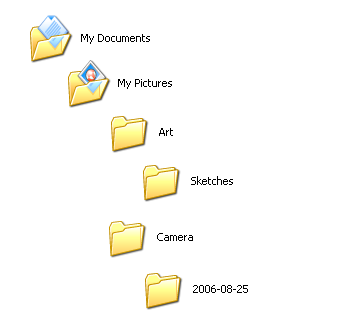
My Documents contains My Pictures, which houses the Art and Camera folders. The Art folder contains a folder named Sketches, while the Camera folder contains one named 2006-08-25.

When I want to find one of my sketches using Windows Explorer, I double-click My Documents, double-click My Pictures, double-click the Art folder, and double-click Sketches. Now, I know that I store my photos in a folder called Camera in the My Pictures folder. If I want to then check out the photos I took on the 25th of August 2006, I click Back, Back and then open the Camera folder and open the folder labeled “2006-08-25”.

To get out the Camera folder, we should first put away the Art folder. Tidyness *is* next to godlyness, after all. 

In my mind, I know that the folder called My Documents contains another folder called My Pictures, and in that folder are two others, called “Art” and “Camera”. Therefore, I know that if I want to get to the Camera folder from the Art folder, I must first “put away” the Art folder back into the My Pictures folder (i.e click “Back”) and then “take out” the Camera folder, placing the My Pictures folder down for the moment so I can place my full attention on the Camera folder.

This is no different from real life; indeed, the only thing that’s changed is that it’s all so much faster. This is the point John was trying to make with the Spatial File Manager; however, the analogy works just as well for the Browser File Manager.

Strings and File Paths

Even when I do type paths, I don’t think of them as strings. The path \\blah\shared\test\ means that the computer named “blah” contains a folder named “shared”, which contains a folder named “test”. C:\Program Files\MarkKB means the C drive contains a folder named “Program Files” which, in turn, contains a folder named “MarkKB”.

OK, obviously, I don’t actually think that when I’m typing it in, or browsing it in Explorer; rather it all happens automatically – muscle memory kicks in, and I don’t really have to “think” much about the journey, but instead can focus on the destination.

Paths and Landmarks

C:\Users\markkb\Documents\test.doc is no more different than writing Home\Tree\Shops\Gas Station\Roundabout\School.

The reason this works is because its the same way we remember routes to and from places: walking to school, driving to work, taking the bus – we rely on landmarks to get from point A to point B. Landmarks can be anything – T-junctions, gas stations, billboards, crossings, old folk homes, they all contribute to our muscle memory. In the example I used at the beginning, I used My Pictures as the common “landmark” to get from Art to Camera.

Indeed, when you really get down to it, a file path is nothing more than a shorthand compilation of landmarks: C:\Users\markkb\Documents\test.doc is no more different than writing Home\Tree\Shops\Gas Station\Roundabout\School. That a file path would reflect a path in real life (complete with shortcuts! ^^) comes as no surprise – after all, computers are designed to reflect the reality they were created in.

Because, y’know, otherwise they wouldn’t work at all. And that’d really suck.

Saturday, September 15, 2007

Is Windows Live Suite a good idea?

This post was originally posted at my Windows Live Spaces blog. [View original post]

MarkKB's Blog - Sat 15 Sep 2007

Simple answer, yes. But the answer is much more complex than that.

OK, those who frequent my blog (wait, there's people who frequent my blog?) will probably not be that technically inclined, so I'd like to first preface this post with the warning that this post discusses software in a way that many who just update and say 'eh' will not care about. If you are one of those people, it's best not to continue, although if you're feeling courageous, go right ahead.

Now, don't get me wrong: the idea is fine. There's nothing wrong with the unified installer that is Windows Live Suite. It's the execution that bothers me.
"Whatd'ya mean?" I hear you say. Well, there is no way to download standalone installers. It's the unified thingy or nothing.
"But you don't need standalone installers, the unified installer replaces it all!" Which leads me to my second point. You can't download the whole lot and install it offline. You have to be online to install it, and it has to be the latest version.

Personally, I hate installers that exist merely to download the appropriate files of a single program from its servers. AOL is a culprit with their AIM and ICQ installers. For one thing, it kinda makes you think "wait, what's the point of downloading the installer if it's just gonna download stuff anyway?" For another, you're gonna have to pay your ISP for every time you run the installer. This isn't really a point for those who are on a flat-rate plan, more for those who pay by the hour or megabyte, or those with capped plans. Another thing is, of cause, something may be missing in the new version that is in the older, or the new version may be too cluttered, or...

The penultimate reason is because of archivists, those who regularly swap disks between Windows Vista, Win3.1 and MS-DOS 5, those who long for the beta version of Windows 1.0 shown in Byte in 1983, or for that one hard disk containing Star Trek (the cancelled Apple port of System 7 to Intel-based processors). These people want to be able to preserve what once was, or just do so because they like it. Half the screenshots on Wikipedia are due to these people.
If everyone had had an Internet-based installer, we would hear tell of how Netscape 4 sucked, how Windows Live Messenger was once dubbed "MSN Messenger", or Firefox went through three name changes, or how Microsoft Office used to have cute little characters bouncing around their work, and we'd say, "yeah right, prove it." Proof is one of the key concepts in history, and many people have spent decades arguing proof of historical fact.

Lastly, what if Microsoft disappears? What happens if their servers go down? People of tomorrow may start up their installers, only to find the message "Server not found" staring them in the face. (Of cause, Messenger won't work anyway, but stuff like Mail and Writer, which works with other stuff, and Photo Gallery, which doesn't need an Internet connection, won't install either.)

Again, I have no problems with the Windows Live Suite installer. It's a good idea. It means I don't have to go all over the Windows Live site to get the various programs in the Suite. It's just the lack of alternates, or of something tangible on our hard disks, that I don't like.

So my suggestion to Microsoft is this: provide both an offline and online installer, or better yet, optional standalone installers like in previous versions. Or maybe make the installer so it download the stuff to a non-temporary folder where we can get it and use for later. Don't do this to us, the users.

Saturday, July 22, 2006

Zone Blues

This post was originally posted at my Windows Live Spaces blog. [View original post]

MarkKB's Blog July 23rd 2006

I hate it when people don't read.

Like when people message me on WLM when meh status is set to "Away" (you know who you are!)

Or when people complain about an issue that's already been addressed.

For instance, those who play on the Zone will know that the so-called "Classic Games" have been retired due to aging technology and ancient servers. This resulted in an uproar among the community.

But it seems all the ho-ha is about two things: lobbies and ZoneFriends.
The "lobby" was where you would stand around and chat until you were ready to play, or until a game freed up. Some people just stood around and chat, never actually playing a game. ZoneFriends was a IM program.

With the retirement of Classic games, and no replacement for lobbies in the new ones, disgruntiled Zoners flooded the forums with messeges such as IWANT ZOEN BAK!!! or, those with more brains, left to flock to GameSpy Arcade, Yahoo! Games and the like. The rest of us accepted these changes.

Mind you, I thought the new games were better, with better graphics, and faster response time. Oh well.

I also thought that the Zone team had made it clear that they were working on a replacement. Apparently I was wrong about that too.

From Beyond The Zone:

What about ZoneFriends?
Along with our old servers, the ZoneFriends tool will be taking a long-overdue retirement. All of our remaining (and future!) multiplayer games will be integrated with MSN Messenger. This is a big, big step forward for us. With its wide range of contact and message functions, handy additional features and even exclusive games, Messenger is everything that ZoneFriends wanted to be when it grew up.

So, wait, does this mean no lobbies?
That’s correct, at least for now. The old lobby system was built into our earliest classic games, and is to current game technology what a biplane engine would be to a stealth jet: similar, but essentially incompatible. Online gaming is all about community, so in addition to the in-game chat and Messenger-based invitation ability of our new multiplayer games, we’ve been researching new social and community features for both the games and our site in general. Of course the end result will be fun to use, but we’re also aiming for something that will still be as fun and useful after our second decade joins the first.

Bold emphasis added by me.

Beyond The Zone was an article that was displayed both on the main page and on the page of every Classic-based game.

Another gripe was that for some games, such as Bridge, the new version would be instated a few months after the old version was retired.

Let me make an analogy to a famous example: Gran Turismo. Gran Turismo is the most played PlayStation game ever. It is considered to be the racing sim. The original version alone sold 10.84 million units, forget Gran Turismo 4. The entire series is the ninth most-sold franchise in the world, with 43.7 million units sold in total.

Gran Turismo 2 was rushed to release in Nov 20 1999, so it could be out in the stores by the holidays. Sony publically admitted that development of the game had not been completed. As such, it had a lot of glitches, including the famous Plam Strip track, the remnent of the Drag Racing track that was removed so they release it on time.

This could happen to Bridge, if it were released before it was ready.

But then the Zone reinstated Classic Bridge due to "popular demand". What do people do to show their appretiation?

They spam the board.

Darned if ya do, darned if you don't.

Now, everyone wants their own classic games back, not considering that perhaps they're struggling to keep those remaining old servers running. (If I'm right, they're only running Bridge from a few old servers in the corner, as opposed to the many they had before that were running Classic Games.)

So... yeah, that's all from meh for today...

--MarkKB